.NET MAUI & Xamarin Forms Getting Started 

.NET MAUI & Xamarin Forms Getting Started 

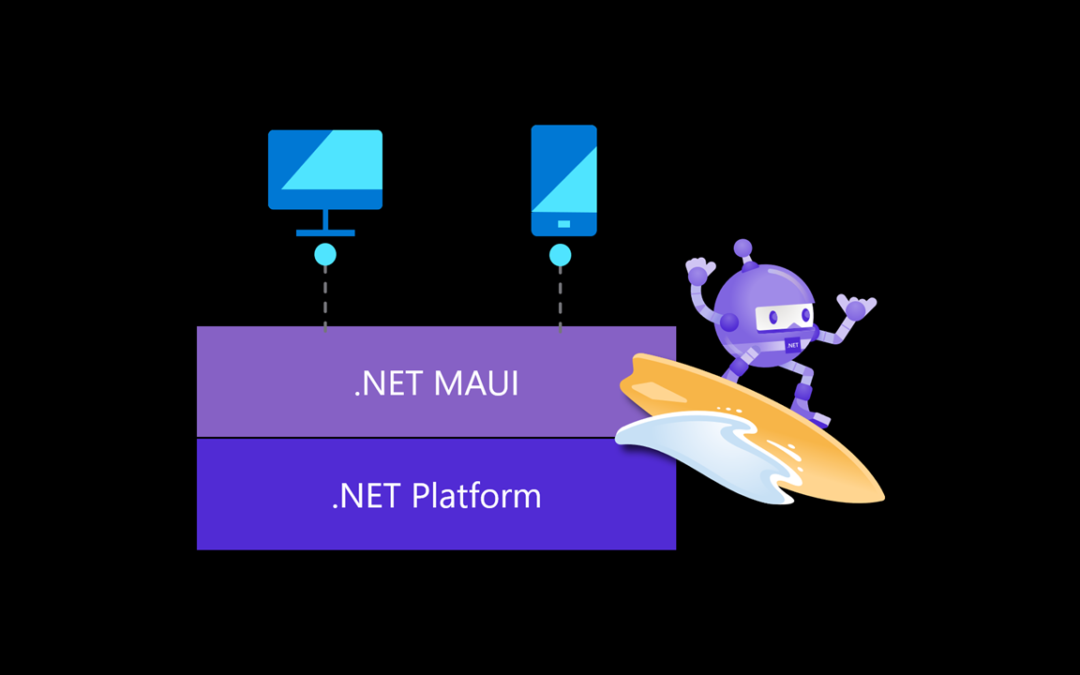
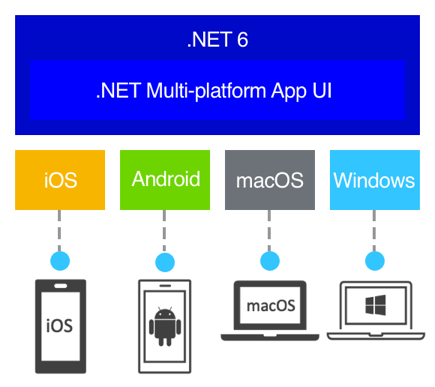
.NET Multi-Platform App UI, also known as .NET MAUI, is an open-source cross-platform framework for creating native apps. The main idea here is to enable implementation of UI Layout and all the app logic in a single code-base. 

Key Benefits: 

  • Write cross-platform apps in XAML and C#, from a single shared code-base in Visual Studio.
  • Share UI layout and design across platforms.
  • Share code, tests, and business logic across platforms.
.NET MAUI


How it works

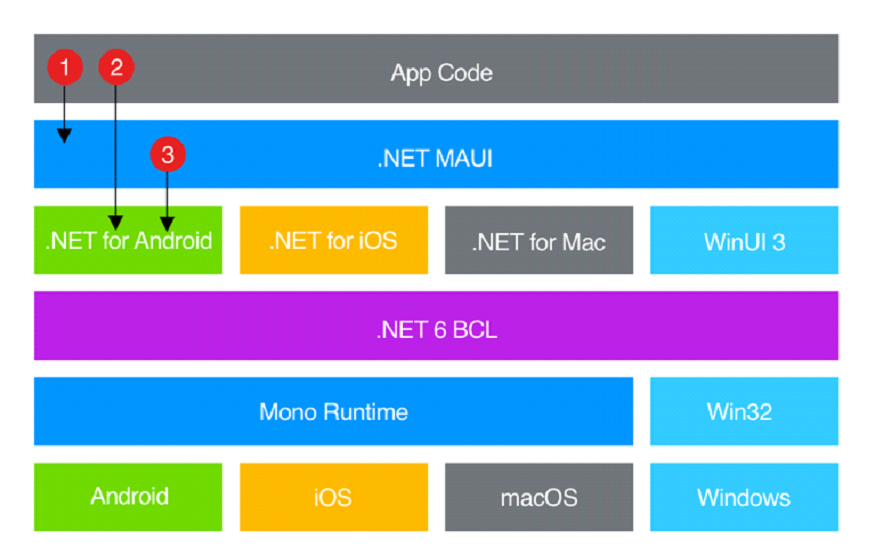
.NET MAUI provides singular APIs for developers, which access native platform APIs. It can also be imagined as a C# wrapper for multiple native platform APIs, providing a write-once, run-anywhere experience.  

Main Idea:

  1. Write code that interacts with .NET MAUI API.
  2. App code can directly access .NET wrapped versions of the native APIs.
  3. .NET MAUI can directly consume the native platform APIs.
.NET MAUI

Android:

.NET MAUI compile from C# into intermediate language, which is then Just-in-time (JIT) compiled to native assembly during app launch. 

iOS:

iOS builds compile ahead-of-time (AOT) from C# into native ARM assembly code. 

Windows:

.NET MAUI uses WinUI3 library internally to create apps that target Windows. 

macOS:

Built using Mac Catalyst.

Supported Platforms

.NET MAUI platform requirements:

  • Android 5.0 (API 21) or higher.
  • iOS 10 or higher.
  • macOS 10.13 or higher, using Mac Catalyst.
  • Windows 11 and Windows 10 version 1809 or higher, using WinUI3

.NET MAUI Blazor apps have the following additional platform requirements:

  • Android 7.0 (API 24) or higher is required
  • iOS 14 or higher is required.
  • macOS 11 or higher, using Mac Catalyst.

Environment Setup

.NET MAUI is the evolution of Xamarin Forms and is embedded directly into .NET 6 framework. As such, the development environment setup has gotten simpler. 

At the time of writing this, one must install Visual Studio 2022 Preview to access .NET MAUI. MAUI is targeted for release in June 2022.

Setup Steps:

  1. Download Visual Studio 2022.
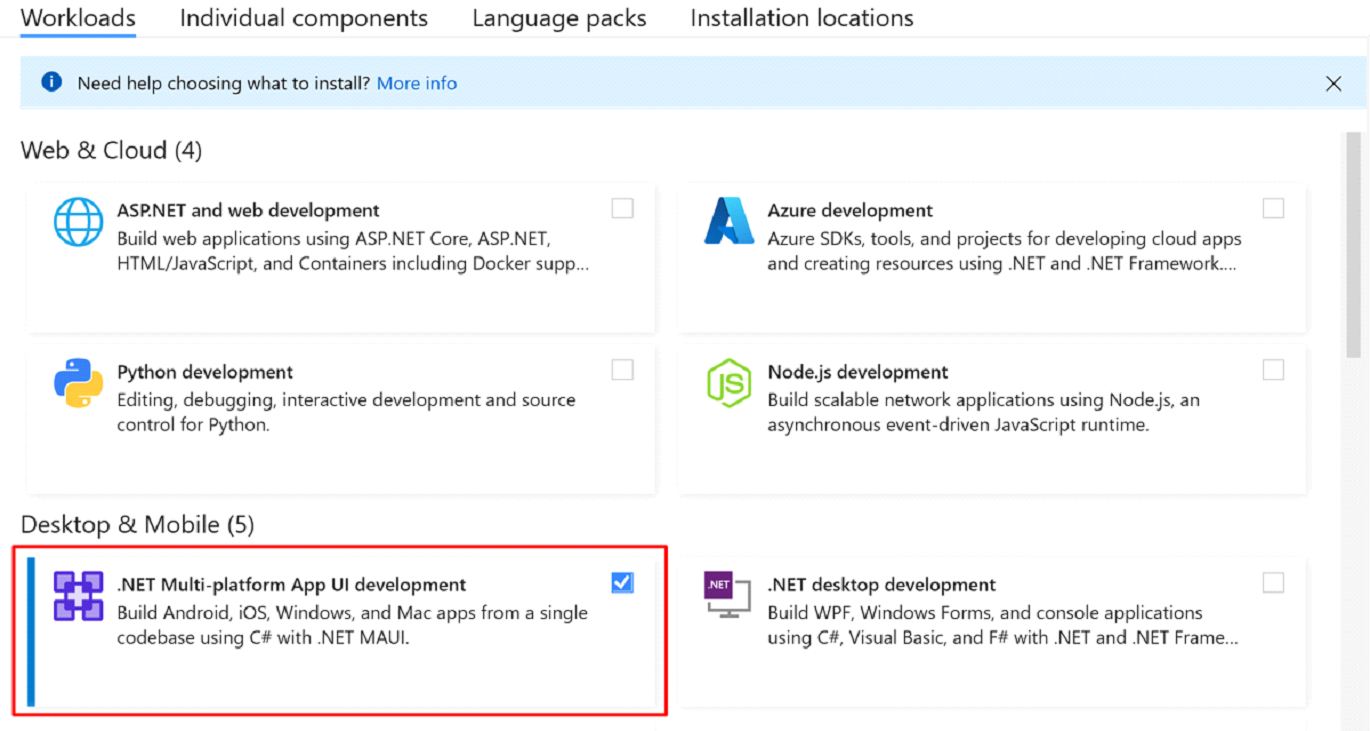
  2. Modify the installation to include .NET MAUI development workload.  
MAUI install
XAMARIN FORMS MIGRATION TO.NET MAUI

XAMARIN FORMS MIGRATION TO.NET MAUI

 .NET MAIU is the evolution of Xamarin Forms, and as such, Xamarin Forms apps will need to migrate to .NET MAUI to continuously benefit from future security updates and features. Having to rewrite existing Xamarin Forms apps as .NET MAUI apps is not an ideal choice most vendors are willing to make.

It’s in Microsoft’s best interest to retain all existing Xamarin Forms clients. Having to rewrite existing applications will not only leave a bad impression with loyal clients, but also incentivize them to explore other cross-platform development technologies like React Native, Unity, and Flutter. Thus, Microsoft has provided a framework for Migrating Xamarin Forms application to .NET MAUI. 

Xamarin Forms is a complete application framework with cross-platform UI library for mobile app development, compatible with up to .NET 5. Cross-platform development was fully integrated into .NET 6, providing a series of platform-specific frameworks as a base standard. This paradigm shift creates a single project approach to cross-platform development, in comparison to the traditional multi-project per target platform approach. 

Microsoft has provided information on how to migrate existing Xamarin Forms applications, though not without its challenges. It is also important to note, as of writing this, there isn’t any process to migrate Xamarin UWP projects, only android and iOS.

The following are the high level steps to migrating Xamarin Forms application to .NET 6:

  1. Convert the projects within a Xamarin Forms solution from .NET framework to .NET SDK style.
  2. Update namespaces.
  3. Update any incompatible NuGet packages.
  4. Address any breaking API changes.
  5. Run the converted app and verify that it functions as expected.

All documentations regarding .NET MAUI and it’s evolution can be found here: https://docs.microsoft.com/en-us/dotnet/maui/

Pre-Migration Steps:

  1. Migrating Xamarin Forms applications will need to be updated to Xamarin.Forms 4.8 or higher. 
  2. At this moment, migration on Windows using Visual Studio 2022 Preview is the recommended path by Microsoft. 
  3. Ensure the environment is setup for .NET MAUI, including all necessary workloads installed. Confirm the environment is able to build and run a blank .NET MAUI application. https://github.com/dotnet/maui/wiki#getting-started
  4. Backup the solution targeted for migration. 

Manual Migration Steps:

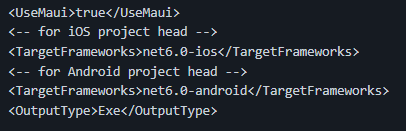
  1. csproj files update: In the existing Xamarin Forms application, targeting iOS and Android, there are at least three project files that will need to be updated.a
    a. Shared Common Project (csproj). Example: https://github.com/maddymontaquila/PlantLady/blob/maui-migrate/PlantLady/PlantLady/PlantLady.csproj

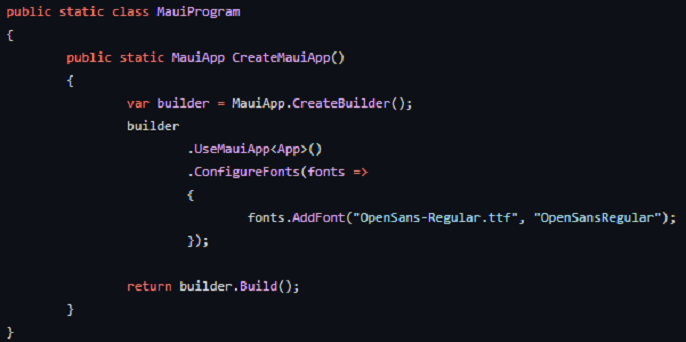
2. In the shared project, add a file called MauiProgram.cs and add the MauiAppBuilder: https://docs.microsoft.com/en-us/dotnet/maui/fundamentals/single-project#app-entry-point

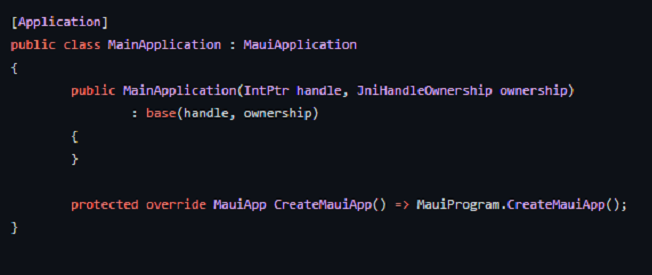
3. In the Android Project.
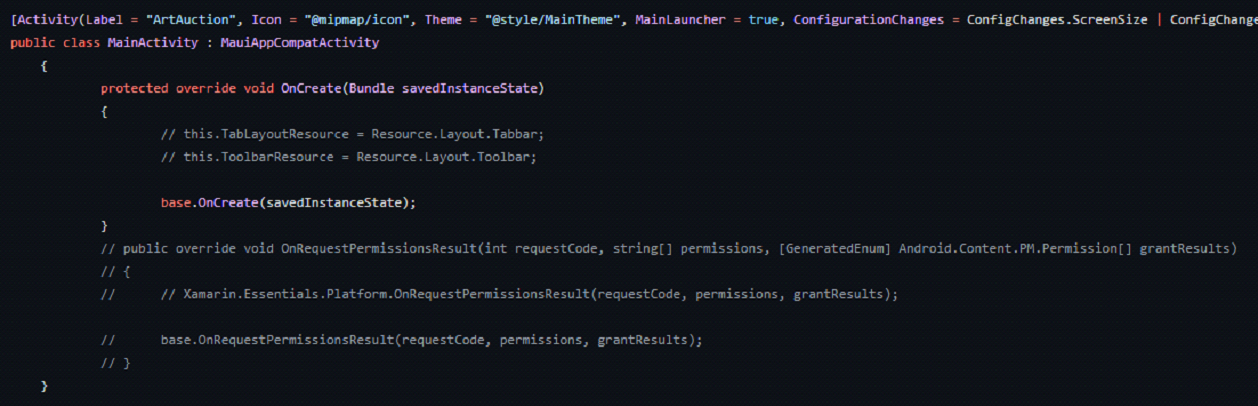
Add file MainApplication.cs to this:

4. In the iOS Project.

Update Info.plist MinimumOSVersion to 15.2.
Update AppDelegate.cs to inherit from MauiUIApplicationDelegate

5. In all projects, shared and platform target projects, delete or comment out the contents on the AssemblyInfo.cs.

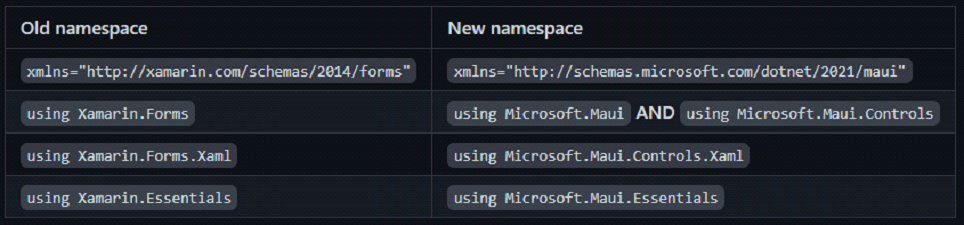
6. Update the following namespaces globally (VS Find and Replace is your best friend here):

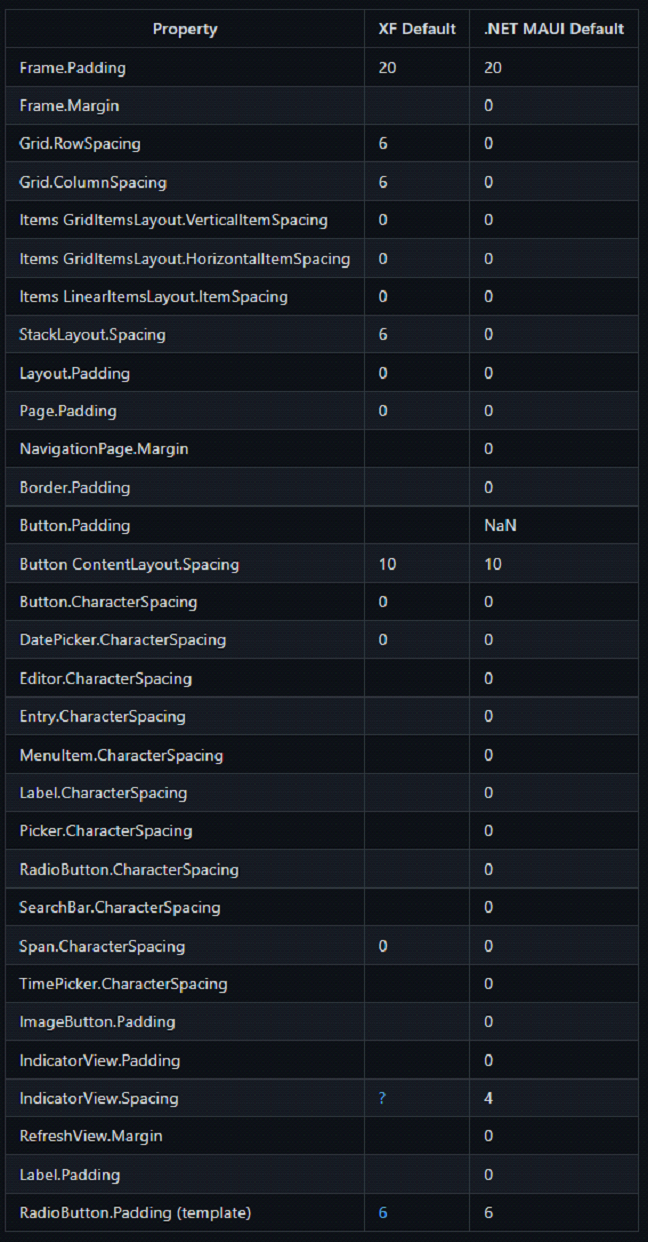
7. Please note the following default padding/margin/spacing changes from Xamarin Forms.

8. Known common API changes:

    • Colors and Shapes are in Microsoft.Maui.Graphics
    • Color.Default DOES NOT EXIST == use ClearValue if you can instead 
    • Color == Colors For example: Colors.Red;
    • Frame: BorderColor = “Accent” DOES NOT EXIST
    • ToolbarItem: Icon == IconImageSource
    • Button: Image == ImageSource
    • Span ForegroundColor DOES NOT EXIST

9. Please refer to the following link on layouts and make the appropriate changes to XAML files: https://docs.microsoft.com/en-us/dotnet/maui/user-interface/layouts/

10. Update nugets in the solution:

    1. Delete Xamarin.Forms and Xamarin.Essential 
    2. Replace Xamarin.Community Toolkit with latest preview of .NET MAUI Community Toolkit: https://github.com/CommunityToolkit/Maui
    3. Replace SkiaSharp (if you are using it)  with the latest preview:
      https://www.nuget.org/packages/SkiaSharp.Views.Maui.Controls
      https://www.nuget.org/packages/SkiaSharp.Views.Maui.Core/
      https://www.nuget.org/packages/SkiaSharp.Views.Maui.Controls.Compatibility
      Please note that not all libraries used will have a convenient replacement for MAUI. A decision to migrate the existing library or use another compatible library for the same behavior needs to be made. Helpful link: https://www.nuget.org/packages/SkiaSharp.Views.Maui.Controls.Compatibility

11. The final step is usually the most challenging for larger or older Xamarin Forms applications. The final step is to fix any other outstanding errors and try to get the project to build. A helpful technique would be to comment out all the errors that can be commented out and get the solution to build. Once the projects are building, revisit the comments and fix them then  build consecutively.

For more details on migration steps: https://github.com/dotnet/maui/wiki/Migrating-from-Xamarin.Forms-(Preview)

Challenges:

The largest challenges with migration to .NET 6 are faced with incompatible external libraries. Because .NET MAUI is still in preview, only the large, more popular libraries have taken some steps to providing a compatible version. For example, many earlier Xamarin Forms projects use the PRISM library to manage MVVM pattern. To migrate PRISM based Xamarin Forms project will provide a challenge to even the microsoft MAUI team. Fortunately, PRISM now has a preview available for .NET MAUI. https://github.com/dansiegel/Prism.Maui

Why Developers Love Xamarin

Why Developers Love Xamarin

With a single, free IDE, Visual Studio, developers can build a fully functioning Android, iOS, and Windows applications. One of the best aspects is limiting the difficulty of entry. Not having to be proficient in Java to develop an Android application and  similarly, SWIFT for iOS is a major advantage. The idea a programmer can use a matured language like C# and leveraging power of .NET with all previously published .NET standard libraries right out of the box to build a modern and efficient application is a fantastic opportunity. 

Some of the benefits for developers are listed below:

  •  The biggest one for developers is putting effort into learning .NET framework and Azure helps them minimize the learning curve and the number of things to keep up-to-date on, all while giving them the opportunity to create just about anything. For example, with .NET, one can create mobile applications with Xamarin, websites with ASP.NET and .NET Core, games for all types of platforms with Unity3D, IoT with Azure Cloud, and more. 
  • Xamarin provides native UI interface and material design out of the box. This means nothing additional needs to be done in most cases to achieve a native looking app. 
  • Xamarin has always promised access to native APIs. This means, the developer has the power to access the same things that native developers would have. 
  • There is a vast collection of free knowledge and learning available at https://docs.microsoft.com/en-us/learn/
  • Learning and becoming proficient in the .NET technology stack by getting certifications can help grow careers while uniquely qualifying for a variety of applications from a vast number of companies. 


What’s New

Xamarin.Forms 4.4 and 4.5 are the newest stable versions available at the moment. They were released in December 2019 and February 2020 bringing some much requested support and improvements like Animated GIF, Carousel View, AndroidX libraries to name a few.

Why Companies Love Xamarin

Why Companies Love Xamarin

One of the main reasons why clients love Xamarin Forms is that it only requires a single technology stack. This means companies wouldn’t need to hire and manage a team to support iOS, Android, Windows with different programming languages and Integrated Development Environment (IDEs) proficiencies. The team could focus on proficiency in C# in Visual Studio Environment. The same team can also be utilized for the back-end server development with .NET technologies like ASP.NET Core. This gives enormous flexibility when ramping and managing a team.

Rapid prototyping and development is found at the core of Xamarin Forms. Majority of the code like views, pages, business logic, and more could be implemented in a shared codebase, drastically reducing the development time. Clients also have the flexibility of displaying pages in native style, material design, and/or completely custom look and feel on a page by page basis. This level of flexibility is unique to Xamarin.Forms at the time of writing this article. 

When done correctly, Xamarin.Forms can give similar performance to that of a natively developed app because it complied as a native app. Xamarin gives the ability to access the full spectrum of functionality exposed by the underlying platform and device. By giving access to each native and hardware specific API, it is possible to do almost anything that is possible to do from a native development environment, like Bluetooth support, camera support, native maps support, and other SDK support. 

Quick Introduction to Xamarin Forms

Quick Introduction to Xamarin Forms

Xamarin.Forms is a cross-platform UI framework. It is designed for .NET developers to be able define the UI in a platform independent manner using primarily C# and XAML.  Xamarin at it’s core provides a 1-to-1 API mapping to the native platform, so the UI is compiled down to the appropriate native UI engine, providing a native experience for the end user on Android, iOS, and Universal Windows Application alike.

The idea here is to write code in C# using .NET toolset and development environment while also sharing as much code as possible. The end product will have a native experience on all the supported target platforms. Since the common project is a .NET Standard project, developers have access to a vast amount of compatible libraries, which is a major benefit!

Xamarin Forms was introduced in May, 2014. Xamarin was primarily supported by Microsoft and now it is open source [ https://github.com/xamarin/Xamarin.Forms ]. At the time of writing this, Xamarin.Forms is almost at it’s fourth major iteration, Xamarin.Forms 4.0.


Following are some great educational material for Xamarin:

Microsoft Docs: https://docs.microsoft.com/en-us/xamarin/xamarin-forms/

Xamarin University (moving to Microsoft Learn): https://university.xamarin.com/

Xamarin Blogs: https://blog.xamarin.com/