
XAMARIN FORMS MIGRATION TO.NET MAUI
.NET MAIU is the evolution of Xamarin Forms, and as such, Xamarin Forms apps will need to migrate to .NET MAUI to continuously benefit from future security updates and features. Having to rewrite existing Xamarin Forms apps as .NET MAUI apps is not an ideal choice most vendors are willing to make.
It’s in Microsoft’s best interest to retain all existing Xamarin Forms clients. Having to rewrite existing applications will not only leave a bad impression with loyal clients, but also incentivize them to explore other cross-platform development technologies like React Native, Unity, and Flutter. Thus, Microsoft has provided a framework for Migrating Xamarin Forms application to .NET MAUI.
Xamarin Forms is a complete application framework with cross-platform UI library for mobile app development, compatible with up to .NET 5. Cross-platform development was fully integrated into .NET 6, providing a series of platform-specific frameworks as a base standard. This paradigm shift creates a single project approach to cross-platform development, in comparison to the traditional multi-project per target platform approach.
Microsoft has provided information on how to migrate existing Xamarin Forms applications, though not without its challenges. It is also important to note, as of writing this, there isn’t any process to migrate Xamarin UWP projects, only android and iOS.
The following are the high level steps to migrating Xamarin Forms application to .NET 6:
- Convert the projects within a Xamarin Forms solution from .NET framework to .NET SDK style.
- Update namespaces.
- Update any incompatible NuGet packages.
- Address any breaking API changes.
- Run the converted app and verify that it functions as expected.
All documentations regarding .NET MAUI and it’s evolution can be found here: https://docs.microsoft.com/en-us/dotnet/maui/
Pre-Migration Steps:
- Migrating Xamarin Forms applications will need to be updated to Xamarin.Forms 4.8 or higher.
- At this moment, migration on Windows using Visual Studio 2022 Preview is the recommended path by Microsoft.
- Ensure the environment is setup for .NET MAUI, including all necessary workloads installed. Confirm the environment is able to build and run a blank .NET MAUI application. https://github.com/dotnet/maui/wiki#getting-started
- Backup the solution targeted for migration.
Manual Migration Steps:
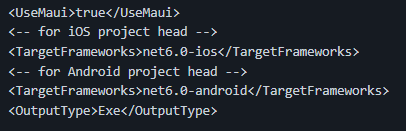
- csproj files update: In the existing Xamarin Forms application, targeting iOS and Android, there are at least three project files that will need to be updated.a
a. Shared Common Project (csproj). Example: https://github.com/maddymontaquila/PlantLady/blob/maui-migrate/PlantLady/PlantLady/PlantLady.csproj

b. Android Project (csproj). Example: https://github.com/Sweekriti91/ArtAuction/blob/maui-projecthead/ArtAuction.Android/ArtAuction.Android.csproj

c. iOS Project (csproj). Example: https://github.com/Sweekriti91/ArtAuction/blob/maui-projecthead/ArtAuction.iOS/ArtAuction.iOS.csproj
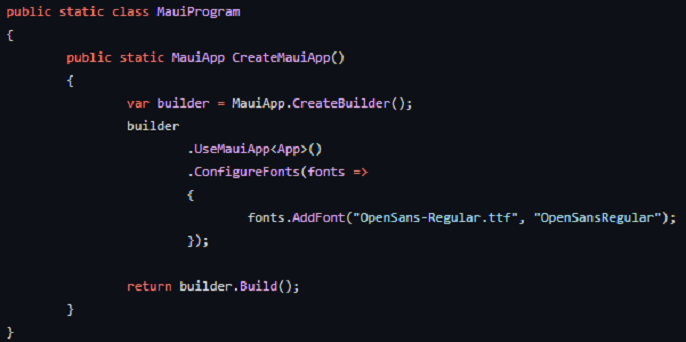
2. In the shared project, add a file called MauiProgram.cs and add the MauiAppBuilder: https://docs.microsoft.com/en-us/dotnet/maui/fundamentals/single-project#app-entry-point
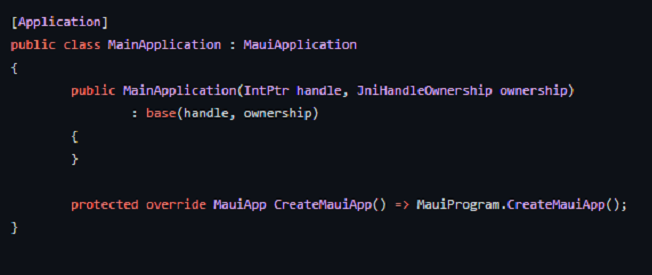
3. In the Android Project.
Add file MainApplication.cs to this:
4. In the iOS Project.
Update Info.plist MinimumOSVersion to 15.2.
Update AppDelegate.cs to inherit from MauiUIApplicationDelegate
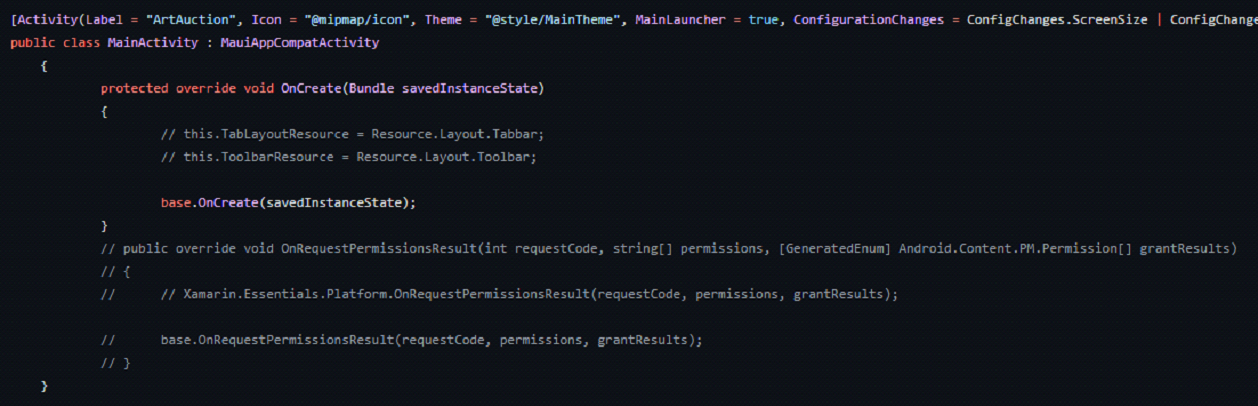
5. In all projects, shared and platform target projects, delete or comment out the contents on the AssemblyInfo.cs.
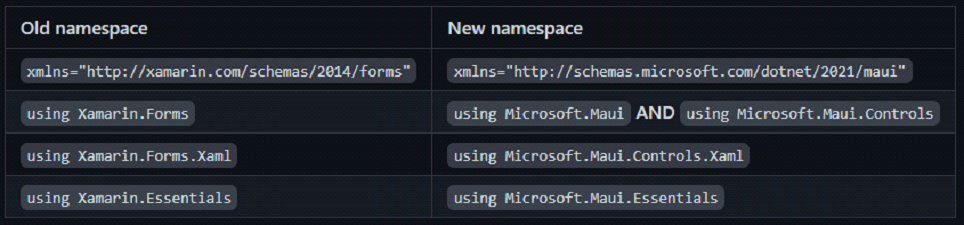
6. Update the following namespaces globally (VS Find and Replace is your best friend here):
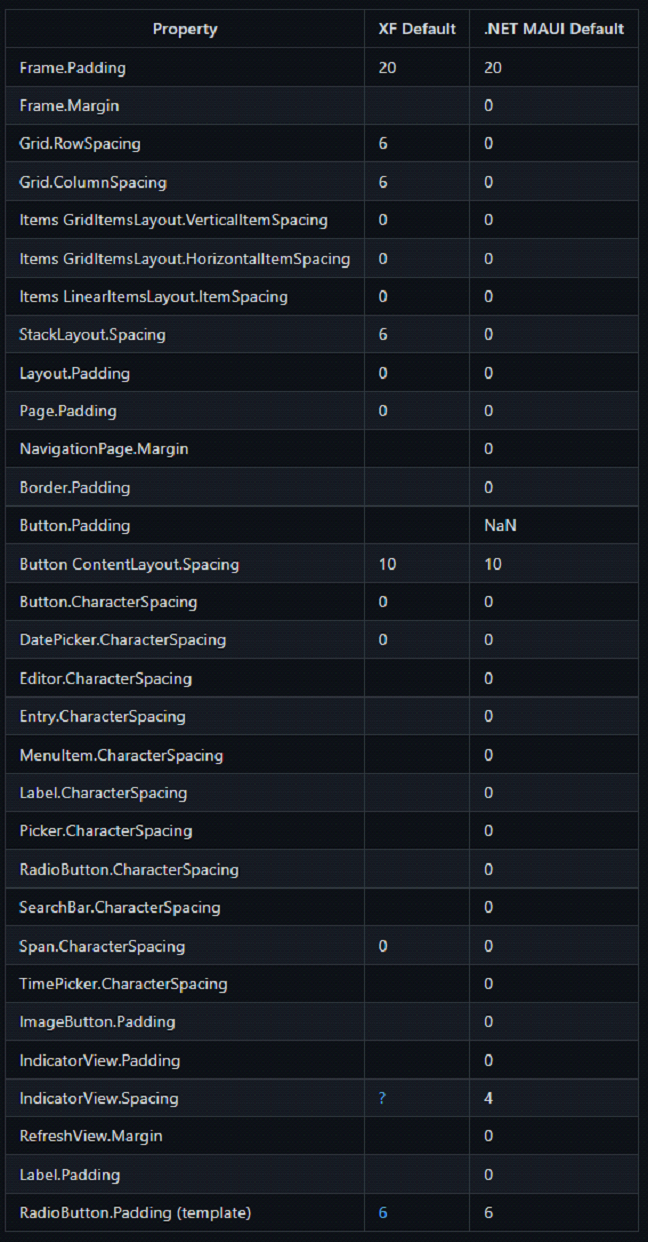
7. Please note the following default padding/margin/spacing changes from Xamarin Forms.
8. Known common API changes:
- Colors and Shapes are in Microsoft.Maui.Graphics
- Color.Default DOES NOT EXIST == use ClearValue if you can instead
- Color == Colors For example: Colors.Red;
- Frame: BorderColor = “Accent” DOES NOT EXIST
- ToolbarItem: Icon == IconImageSource
- Button: Image == ImageSource
- Span ForegroundColor DOES NOT EXIST
9. Please refer to the following link on layouts and make the appropriate changes to XAML files: https://docs.microsoft.com/en-us/dotnet/maui/user-interface/layouts/
10. Update nugets in the solution:
-
- Delete Xamarin.Forms and Xamarin.Essential
- Replace Xamarin.Community Toolkit with latest preview of .NET MAUI Community Toolkit: https://github.com/CommunityToolkit/Maui
- Replace SkiaSharp (if you are using it) with the latest preview:
https://www.nuget.org/packages/SkiaSharp.Views.Maui.Controls
https://www.nuget.org/packages/SkiaSharp.Views.Maui.Core/
https://www.nuget.org/packages/SkiaSharp.Views.Maui.Controls.Compatibility
Please note that not all libraries used will have a convenient replacement for MAUI. A decision to migrate the existing library or use another compatible library for the same behavior needs to be made. Helpful link: https://www.nuget.org/packages/SkiaSharp.Views.Maui.Controls.Compatibility
11. The final step is usually the most challenging for larger or older Xamarin Forms applications. The final step is to fix any other outstanding errors and try to get the project to build. A helpful technique would be to comment out all the errors that can be commented out and get the solution to build. Once the projects are building, revisit the comments and fix them then build consecutively.


For more details on migration steps: https://github.com/dotnet/maui/wiki/Migrating-from-Xamarin.Forms-(Preview)
Challenges:
The largest challenges with migration to .NET 6 are faced with incompatible external libraries. Because .NET MAUI is still in preview, only the large, more popular libraries have taken some steps to providing a compatible version. For example, many earlier Xamarin Forms projects use the PRISM library to manage MVVM pattern. To migrate PRISM based Xamarin Forms project will provide a challenge to even the microsoft MAUI team. Fortunately, PRISM now has a preview available for .NET MAUI. https://github.com/dansiegel/Prism.Maui